Jewellery Repair Software Doesn’t Have to Kill Your Pencil-and-Paper Workshop
Paper repair packets still work for many jewellery workshops. The problem is when paper is the only record. Here’s how Datopia Flow supports paper while protecting the job history.
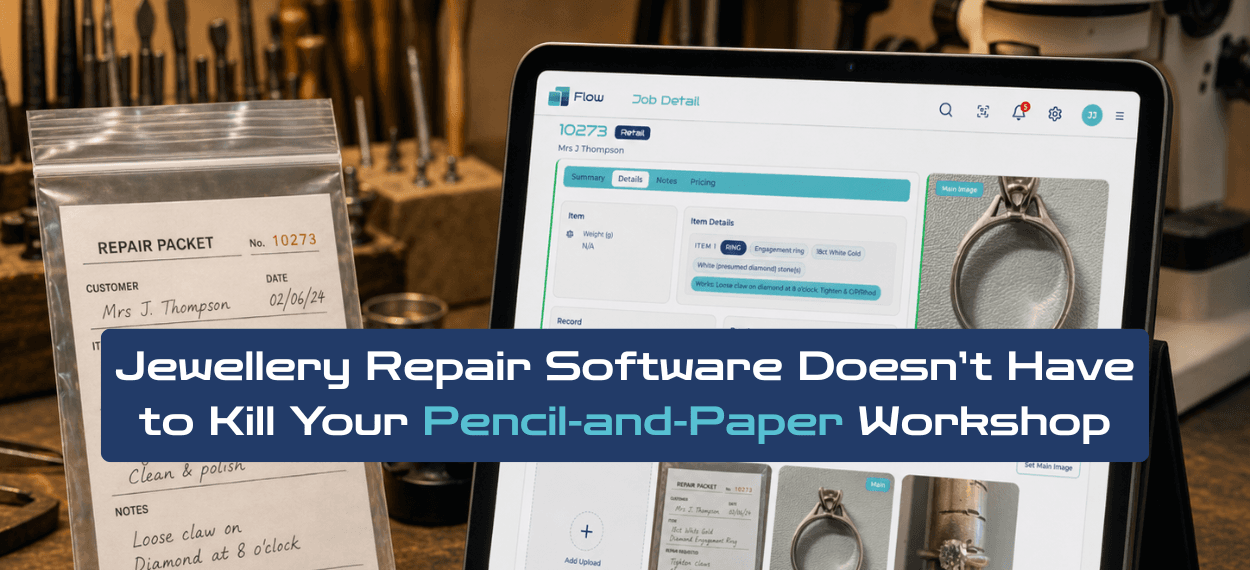
Jewellery repair software does not have to mean throwing away your paper packets, handwritten notes or pencil-and-paper workshop habits.
For many jewellers, paper works. It is quick, familiar, visible on the bench and easy to move with the item. The problem is not paper. The problem is when paper becomes the only place the repair story lives.
Datopia Flow is built around that reality. It helps jewellers keep the packet if it works for the workshop, while adding the protection paper cannot provide on its own: photos, job history, status tracking, due dates, notes and clearer communication across the team.
If your workshop wants to stay paper-based but better protected, Datopia Flow can help you build the best of both worlds.
Ask Datopia about paper-friendly repair tracking
TL;DR
- Paper repair packets are not bad. In many jewellery workshops, they are still fast, practical and familiar.
- The risk starts when the packet is the only repair record.
- A paper packet can be misplaced, damaged, misread or separated from photos, notes and customer updates.
- Datopia Flow can support paper-based workshops by letting staff snap or upload the packet to the repair job.
- That gives the business a permanent record of what was written, even if the physical packet keeps travelling with the item.
- Datopia Flow can also hold the full job record directly, including photos, condition notes, price lines, statuses, due dates and job history.
- The aim is not to kill paper. It is to keep the packet and protect the process.
Paper Is Not the Enemy
Paper is not the enemy in a jewellery workshop. Paper is often the reason the workshop moves quickly.
A repair packet can sit with the item. It can be picked up, marked, handled, moved, clipped, folded, checked and passed from one person to another without needing to open a screen.
That matters in a real workshop. Repairs are not always handled in a neat digital sequence. They move between counter staff, goldsmiths, setters, watchmakers, polishers, trade partners and collection areas. Sometimes a handwritten packet is still the simplest physical companion for the job.
So no, we do not think jewellers need to bin the packet.
Paper is practical. Paper-only is risky.
Where Paper-Only Repair Tracking Starts to Crack
Paper-only repair tracking starts to crack when staff need to find, prove or share information quickly.
That does not mean anyone is doing anything wrong. It usually means the workshop has grown beyond what one packet can safely carry by itself.
And sometimes, quite literally, the packet has carried enough.
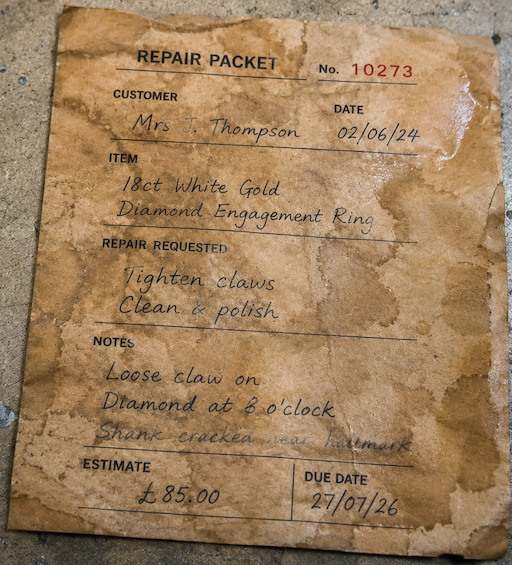
Between pickle pot splashes, ultrasonic water and the mysterious liquids every workshop seems to generate, paper packets do a heroic job. But “still mostly readable” is not the same as “safely recorded”.
Asking you to “imagine” a scenario where this packet is your only proof is not that far-fetched. You’ll probably experience one of these a week.
Common problems include:
- the customer calls, but the packet is in the workshop
- the packet moves, but the update does not reach the counter
- before-photos are stored separately from the job
- notes are hard to read later
- the packet is misplaced or damaged
- a returning customer asks what happened last time
- no one can quickly see overdue or upcoming repairs
- repair history depends on whoever remembers the job
If any of those sound familiar, you may also recognise the signs covered in our article on 5 signs your jewellery workshop needs repair tracking software.
The packet may still be useful. It just should not be the only source of truth.
The Simple Fix: Photograph the Packet
One of the simplest ways to protect a paper-based repair process is to take a photo of the repair packet and store it with the job.
That gives the workshop a permanent record of what was written at the time, while still letting the physical packet move through the business as usual.
This is the win-win for jewellers who want to stay paper-based but better protected:
- keep using the packet on the bench
- snap or upload the packet into Datopia Flow
- store the packet image with the repair record
- keep photos, notes, price lines and job history together
- make the record easier to find later
And if you find your jewellers have added notes as it's moved through the workshop, and it would be useful to keep those notes... Just an another upload before returning the job.
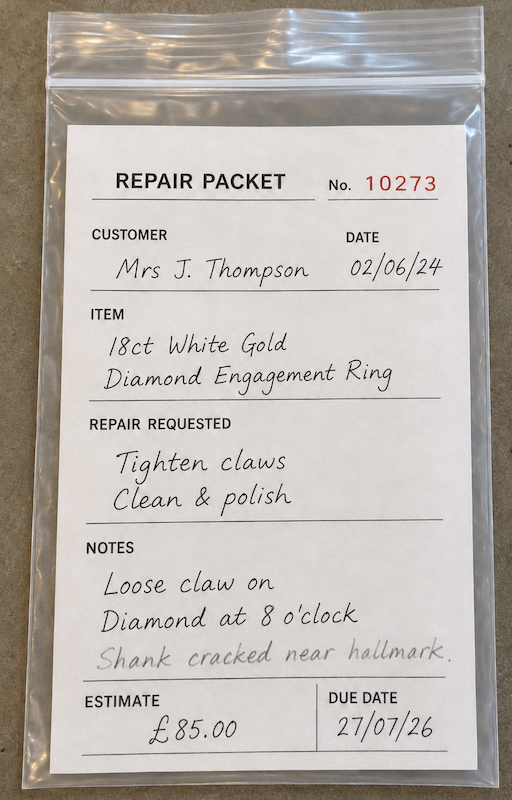
This is not a full process rebuild. It is a practical backup for the way many jewellers already work.
Keep the packet. Protect the process.
What Does Datopia Flow Add Around the Paper Packet?
Datopia Flow adds the missing protection around the paper packet: search, history, photos, statuses and team access.
A packet is good at travelling with an item. Datopia Flow is good at keeping the job information available when the packet is somewhere else.
Datopia Flow can support:
- uploaded packet images
- before-photos and condition photos
- repair notes
- price lines
- customer and item records
- due dates
- repair statuses
- QR job labels
- job history
- team access to the same repair record
- clearer customer updates
That means staff can still use the packet where paper works best, while using Datopia Flow where paper is weakest.
You can explore more of these tools on the Datopia Flow features page.
Two Good Ways to Run a Jewellery Repair Workshop With Datopia Flow
There is not one single correct way to use Datopia Flow in a jewellery workshop.
Some teams want to keep paper at the centre of the daily process. Others want the main job data to live inside the repair software. Both can work.
Option 1: Paper-led, protected by Datopia Flow
In a paper-led workshop, the packet remains the main physical document that moves with the item.
Datopia Flow then acts as the searchable, backed-up repair record. Staff can upload a photo of the packet, add job images, track the status, set due dates and build a proper repair history.
This works well for workshops that like their current packet process but want better protection if the packet is lost, unclear or unavailable.
Option 2: Datopia Flow-led, with paper as the bench helper
In a Datopia Flow-led workshop, the main job details live directly in the repair record.
The packet can still be used as a label, travel document or bench reminder, but the important job information sits in Datopia Flow: photos, notes, price lines, statuses, due dates and history.
This works well for teams that want a clearer shared system across counter, workshop and management.
Neither approach is “better” for every jeweller. The best approach is the one your team will actually use.
What Does This Protect?
A paper-friendly repair system protects the questions that matter most when a customer, staff member or workshop partner needs a clear answer.
For example:
- What did the item look like when it came in?
- What did the packet say?
- What work was agreed?
- What price lines were added?
- What photos were taken?
- What status is the job at now?
- When is the repair due?
- Who last updated the job?
- What did we do last time?
These questions are not just admin. They protect customer trust, workshop confidence and the business itself.
If a customer calls for an update, the counter should not have to hunt for the packet before giving a sensible answer. If a customer comes back later, the team should not have to rely on memory to work out what happened.
Good repair tracking makes the answer easier to find.
How Does This Help Customer Communication?
Paper-friendly repair software helps customer communication by making repair information easier for the whole team to access.
In a paper-only process, the answer may be in the workshop, in a drawer, on a packet, in someone’s head or mixed across several places.
With Datopia Flow, the repair record can keep the important information together. That makes it easier for staff to answer:
- is the job ready?
- what stage is it at?
- is it waiting for approval?
- when is it due?
- what work was agreed?
- has anything changed?
This does not make customer service less personal. It gives staff a better answer before they speak to the customer.
If customer update calls are already becoming a problem, see our guide to 5 signs your jewellery workshop needs repair tracking software.
Why This Matters for Real Jewellery Workshops
Real jewellery workshops are busy, physical places. They are not generic ticket desks.
A software system that ignores the packet, the bench, the tray, the envelope and the handwritten note is asking the workshop to change too much too quickly.
Datopia Flow is different because it can work with the process that already exists. It can support traditional repair packets while giving the business better records, better job history and better access to information.
That matters for:
- independent jewellers
- watchmakers
- goldsmiths
- retail repair counters
- trade repair workshops
- businesses with counter and bench teams
- jewellers sending work to outside specialists
If you are still deciding whether repair software is right for your business, our guide What Is Jewellery Repair Software? explains the wider category.
How Does Datopia Flow Fit a Pencil-and-Paper Workshop?
Datopia Flow fits a pencil-and-paper workshop by adding a clear repair record around the physical packet, rather than forcing the workshop to abandon paper on day one.
It can help with:
- snapping or uploading the repair packet
- recording item condition
- adding before-photos
- keeping repair notes with the job
- tracking statuses and due dates
- recording price lines
- finding jobs quickly
- keeping previous repair history
- giving the counter and workshop the same information
This is especially useful where a workshop wants a simple step forward: keep the packet, but stop relying on the packet alone.
You can see where this fits across different workshop situations on the Datopia Flow use cases page, or compare the available plans on the Datopia Flow pricing page.
Book a paper-friendly Flow discussion
FAQs
Does jewellery repair software replace paper packets?
Jewellery repair software does not have to replace paper packets. A good system can work alongside handwritten packets, labels and workshop notes.
For many jewellers, the best setup is a hybrid process: the packet keeps moving with the item, while the repair software stores photos, notes, due dates, statuses and job history.
Can Datopia Flow work with handwritten repair packets?
Yes. Datopia Flow can work with handwritten repair packets by letting staff snap or upload the packet to the repair record.
That means the workshop can keep using paper while also keeping a searchable record of what was written at intake or during the job.
Why should jewellers photograph repair packets?
Jewellers should photograph repair packets because it creates a permanent record of the instructions, notes or details written on the packet.
If the physical packet is misplaced, damaged or hard to read later, the uploaded packet image can help protect the job history.
Is paper bad for jewellery repair tracking?
Paper is not bad for jewellery repair tracking. Paper can be fast, familiar and useful in a workshop.
The risk comes when paper is the only repair record. Paper is hard to search, back up, share across the team or connect with photos and job history.
What is the best way to track jewellery repairs if we still use paper?
The best way is often to keep the paper packet for the physical workshop process, but also keep a digital repair record.
That record can hold the packet image, before-photos, condition notes, price lines, statuses, due dates and job history.
Can we use Datopia Flow without going fully paperless?
Yes. Datopia Flow is designed to support workshops that are not fully paperless.
You can use it as a backup and tracking layer around paper packets, or as the main repair record with paper used as a physical helper.
What information should be stored with a jewellery repair job?
A jewellery repair job should usually store the customer details, item description, condition notes, photos, agreed repair work, price lines, due date, status, workshop notes and job history.
This makes it easier for staff to answer customer questions, check what was agreed and understand what happened on previous jobs.
Is Datopia Flow suitable for small jewellery workshops?
Yes. Datopia Flow can suit small jewellery workshops because even a small team can struggle when repair information is split between packets, photos, messages and memory.
A small workshop does not need to abandon paper to benefit from better repair records and job history.
Talk to Datopia about paper-friendly repair tracking
Keep the Packet. Protect the Process.
Jewellery repair software should not make a good workshop feel like it has been rebuilt around a screen.
If paper packets work for your team, keep them. Use them on the bench, move them with the item and let staff keep the habits that help the workshop run.
But do not make the paper packet carry the whole business risk on its own.
Datopia Flow helps jewellers keep the physical repair process they know, while adding the record, evidence, history and communication that paper cannot provide by itself.
Start your free Datopia Flow trial